
Content creation has become one of the most exciting ways to share ideas, stories, and skills with the world. Platforms like TikTok and YouTube have opened endless opportunities for creators—whether you’re making short, funny clips, dance challenges, or long-form tutorials. But here’s the truth: no matter how creative your idea is, a video won’t shine unless it’s edited well. CapCut Video Editing Software, a free yet professional-grade tool, has evolved into one of the most trusted editing platforms, particularly for beginners and emerging influencers who want to stand out without spending hours learning complex editing software.
The Magic Behind CapCut’s Popularity
Simple Yet Powerful
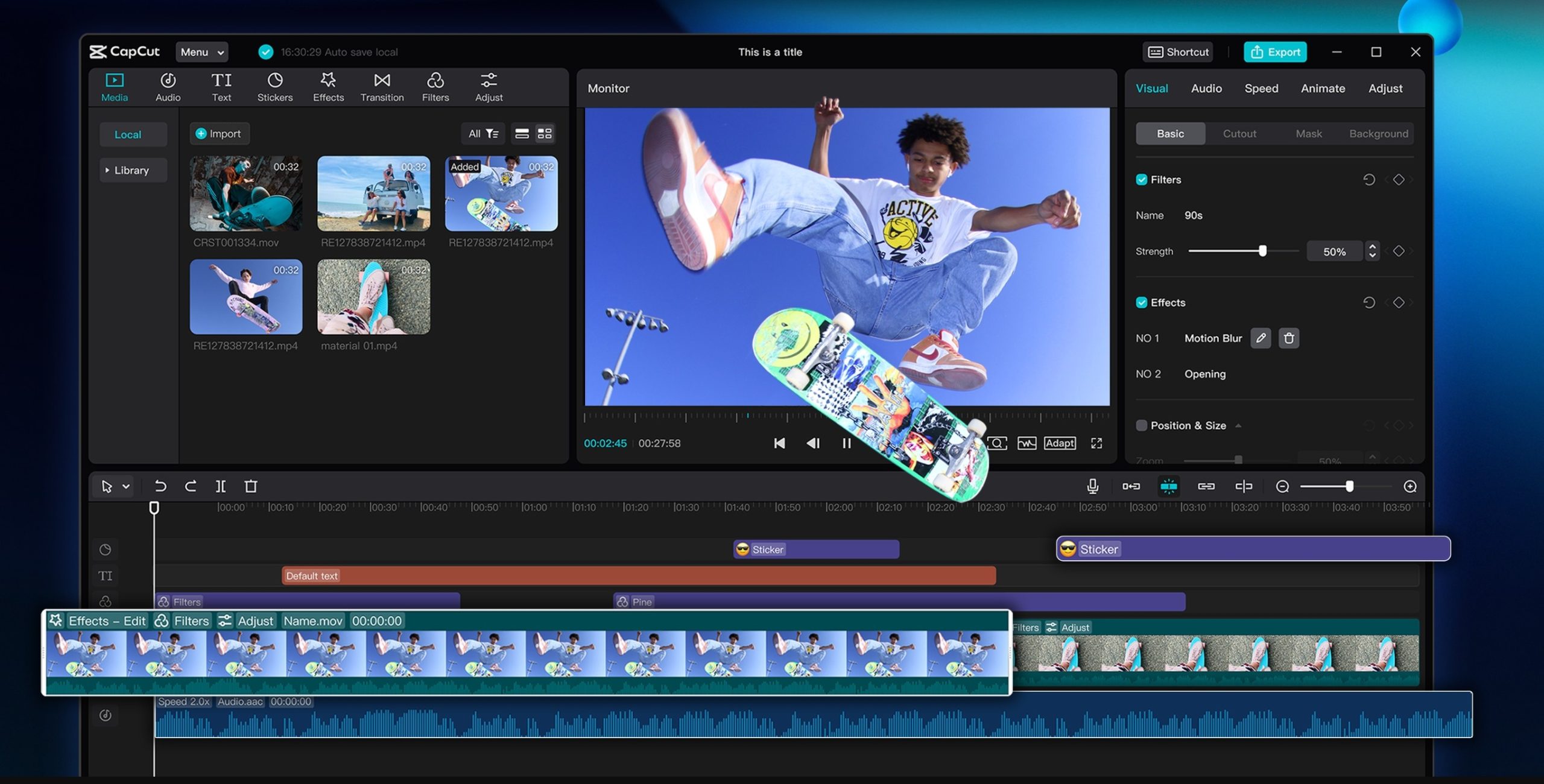
One of the main reasons CapCut is loved is its balance of simplicity and power. The interface is clean and intuitive, so you don’t feel overwhelmed by endless buttons or complicated timelines. At the same time, it offers powerful editing tools—like masking, motion tracking, and chroma key—that you’d usually expect only in expensive software.
For TikTok creators, this means being able to edit short-form videos quickly while still maintaining a polished look. For YouTubers, it means having access to tools that make long-form videos look professional without requiring expensive software.
Trend-Friendly Features
CapCut excels in helping creators stay up-to-date with trends. TikTok thrives on trending music, effects, and transitions, and CapCut makes it incredibly easy to add them. The built-in music and sound effects library, along with trendy templates and effects, ensures creators can ride the latest viral waves effortlessly.
For YouTubers, CapCut offers features such as text animations, subtitles, and aesthetic filters that enhance storytelling. If you’ve seen eye-catching intros, smooth transitions, or dynamic captions on videos, chances are, many of them were crafted with CapCut.
AI Tools That Save Time
CapCut Desktop Video Editing Software surpasses basic editing by incorporating AI-powered features. These include:
- Auto Captions – Generate subtitles instantly for accessibility and better engagement.
- Background Remover – Remove backgrounds without using green screens.
- Voice Changer – Add professional narration or fun character voices.
These tools save creators hours of work while enhancing the engagement of their content. For a TikTok user creating several videos a week or a YouTuber editing long vlogs, this is a game-changer.
Free but Professional
Another significant reason creators flock to CapCut is the cost—or rather, the lack thereof. CapCut Desktop Video Editing Software is completely free to use, offering features that rival those of premium editors. For many new creators who can’t afford expensive software subscriptions, this accessibility makes all the difference.
Why TikTok Creators Love It
On TikTok, speed is everything. New trends emerge every day, and if you want to go viral, you need to edit and post fast. CapCut provides ready-to-use templates, trendy effects, and easy export options optimized for TikTok’s vertical format. The ability to create professional-looking videos quickly helps TikTok creators stay ahead of the curve.
Why YouTube Creators Love It
YouTube requires longer, more polished videos. CapCut supports multi-layer editing, advanced transitions, color grading, and crisp audio editing—everything you need for storytelling. Its simple workflow allows YouTubers to edit efficiently while still producing videos that look like they’ve been cut on professional software.
Why CapCut Desktop Video Editor Is Loved by TikTok and YouTube Creators
If you’re new to CapCut, here’s a simple guide to help you see why it has become the favorite tool of online creators.
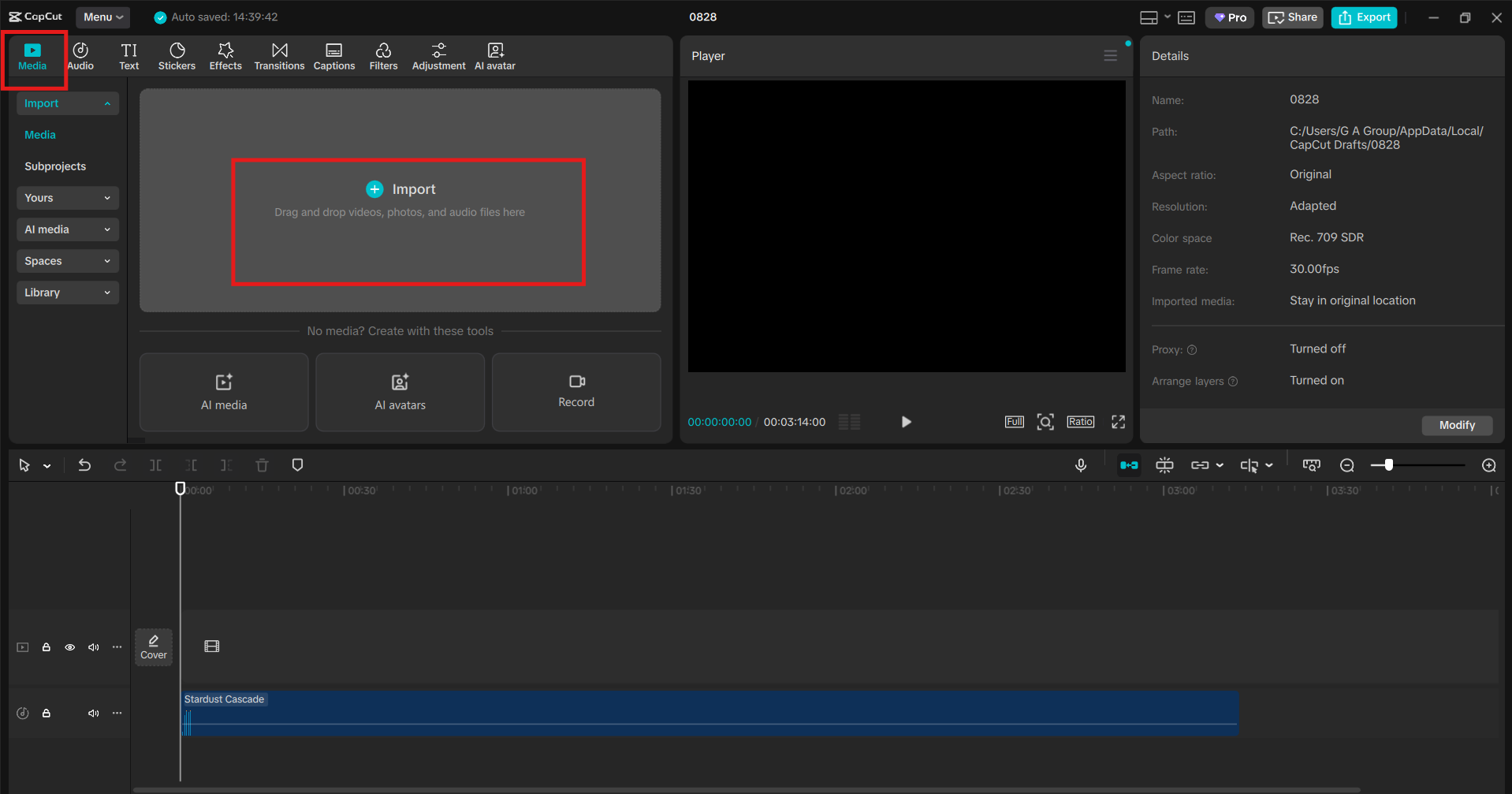
Step 1: Import and Organize Your Clips
Start by opening CapCut Desktop and creating a new project. Import your video clips, images, and music files. The drag-and-drop feature makes it easy to arrange them on the timeline. For TikTok, you might import short clips for quick transitions, while for YouTube, you could bring in multiple long clips and organize them into chapters.
Step 2: Edit with Creative Tools
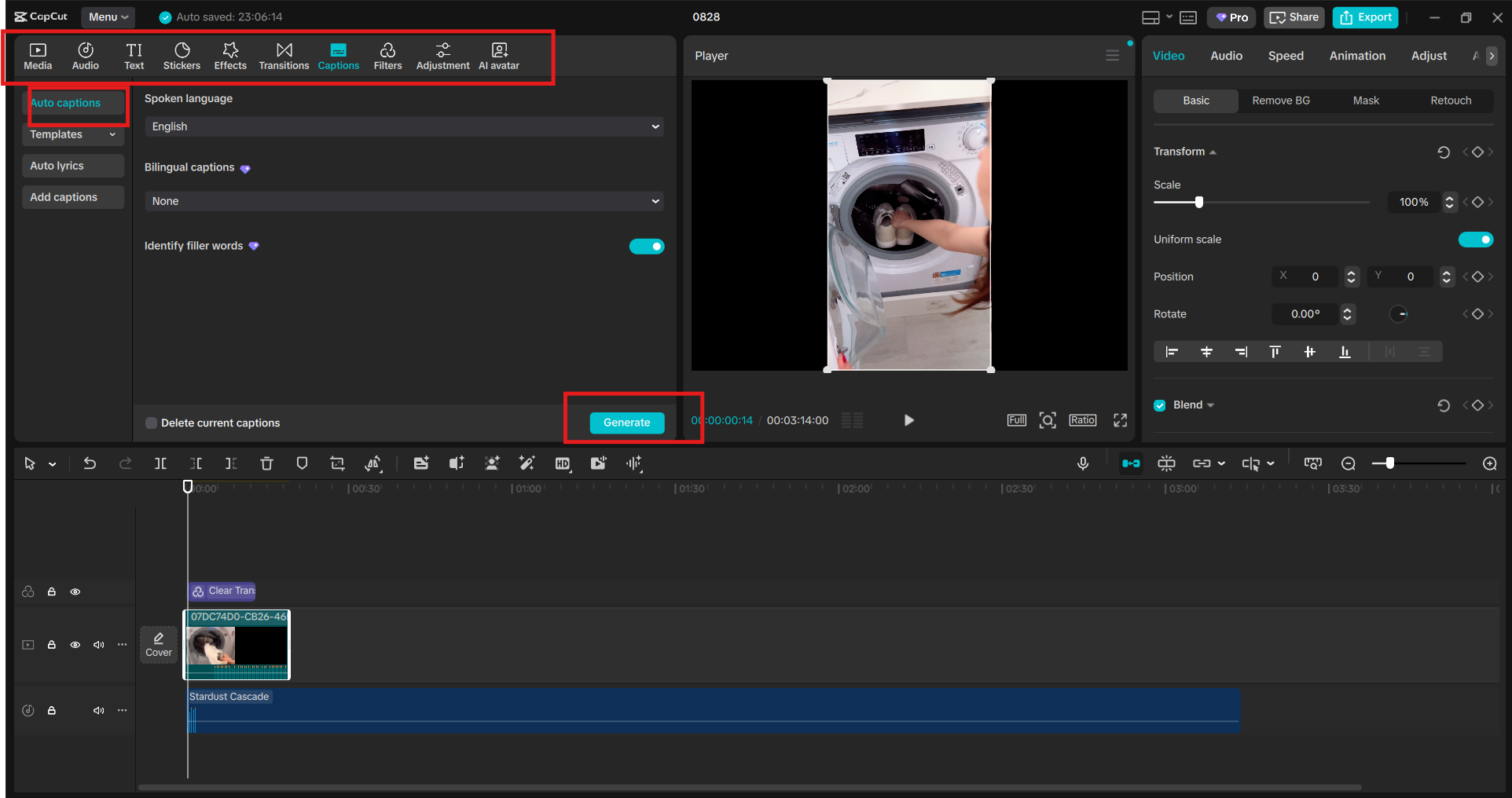
Now comes the fun part—editing. Trim and cut clips, add transitions, and use text animations to make your video stand out. For TikTok videos, you can add trendy effects and filters to give your video a fresh, modern look. For YouTube, you can use multiple video layers, audio adjustments, and background music to polish your storytelling. Don’t forget CapCut’s AI-powered tools here. Use Auto Captions to add subtitles instantly (a must for both platforms), or remove backgrounds if you want to create reaction-style videos without setting up a green screen.
Step 3: Export and Share Seamlessly
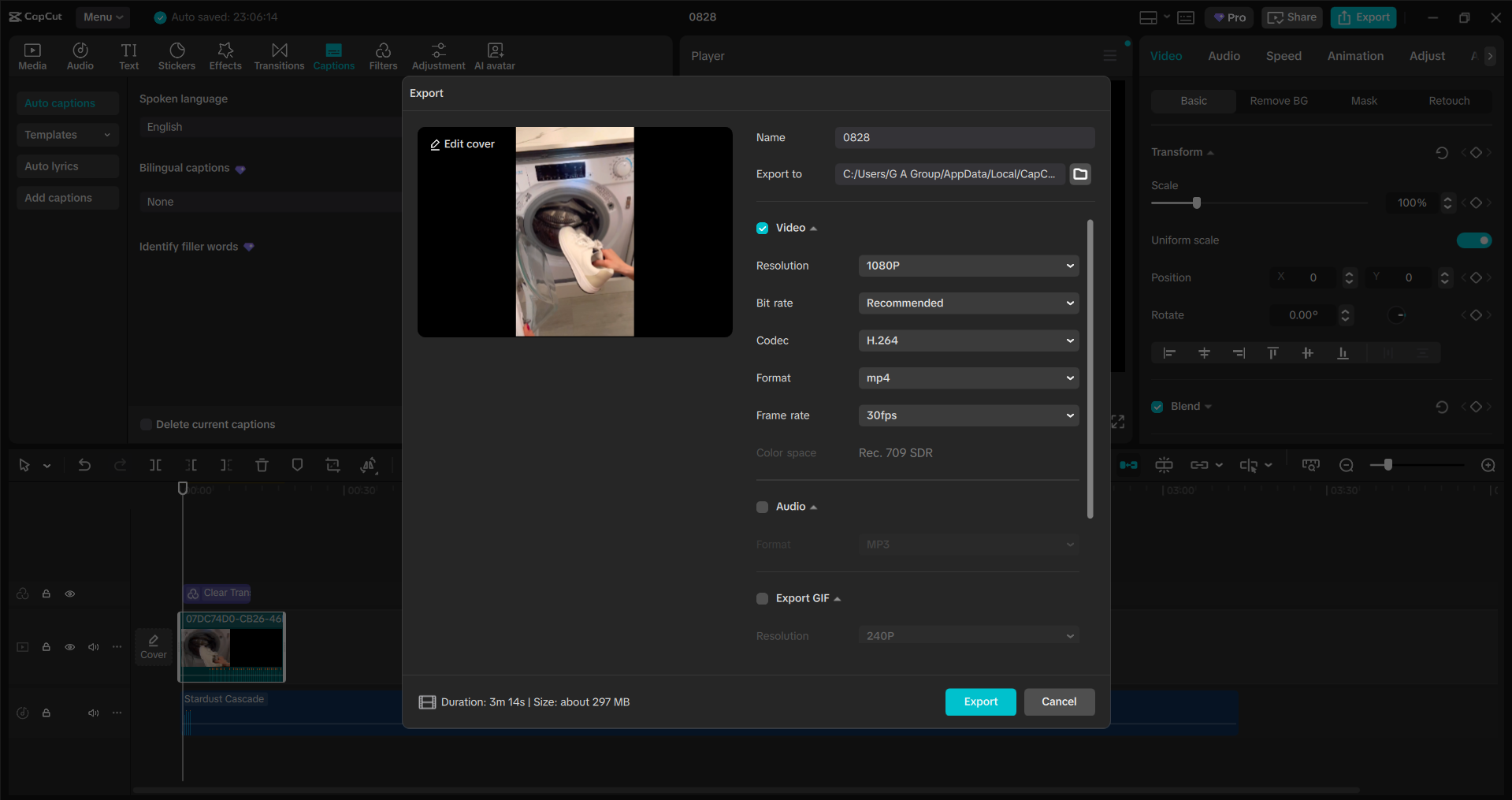
Once your video looks perfect, you can export it in high quality with settings tailored to TikTok or YouTube. CapCut ensures your video maintains crisp visuals and smooth audio. For TikTok, export in the vertical 9:16 format; for YouTube, export in the horizontal 16:9 format. You can also directly upload your finished video from CapCut to TikTok or YouTube, saving time and making the process smoother.
Conclusion
TikTok and YouTube creators need an editor that is fast, flexible, and powerful. That’s exactly what CapCut Desktop Video Editor delivers. It has become a favorite because it bridges the gap between simple editing and professional production, all without incurring any costs. For TikTokers, it’s the perfect tool for staying up-to-date with trends and creating viral content. For YouTubers, it provides the structure and polish needed to grow an audience. And for both, it offers creativity without complexity. So, if you’re a content creator—or planning to become one—it’s clear why CapCut Desktop is loved by millions. It’s more than just an editing tool; it’s a platform that empowers you to tell your story and shine online.